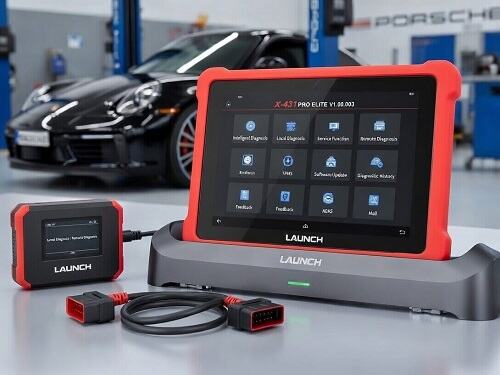
Modern Mercedes-Benz vehicles are equipped with advanced onboard diagnostics and intelligent maintenance systems designed to keep the car running at peak performance. One of the most important features in this system is the service interval reminder, which alerts drivers when routine maintenance is due. For technicians, workshops, and car owners who prefer DIY maintenance, a Mercedes code reader becomes an essential tool for diagnosing issues and clearing service intervals after maintenance is completed.
Kosol specializes in automotive diagnostic tools that help professionals and enthusiasts manage vehicle maintenance with accuracy and efficiency. Understanding how a Mercedes code reader works—and how it helps clear service intervals—can save time, reduce unnecessary dealership visits, and ensure vehicles remain in optimal condition.
Mercedes-Benz vehicles use a Flexible Service System (FSS) or Assyst Plus system depending on the model year. This system tracks driving conditions, mileage, and time to determine when servicing is required. Common service alerts include:
Service A (basic maintenance such as oil and filter change)
Service B (more comprehensive inspection and replacement tasks)
Brake fluid replacement reminders
General inspection warnings
When a service is due, the dashboard displays a message prompting the driver to take action. After completing the required maintenance, the service indicator must be reset using a compatible diagnostic tool.
A Mercedes code reader is an automotive diagnostic device designed to communicate with the vehicle’s onboard computer system (ECU). Unlike basic OBD2 scanners, Mercedes-specific code readers can access manufacturer-specific systems such as:
Engine control module (ECM)
Transmission control unit (TCU)
Airbag and safety systems
ABS and stability control systems
Service and maintenance reset functions
For clearing service intervals, the code reader connects directly to the vehicle’s diagnostic port and interacts with the maintenance system to reset reminders after servicing is complete.
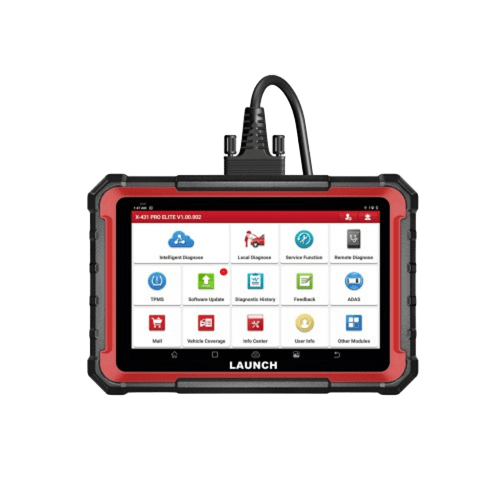
Resetting service intervals is not just about removing a dashboard warning. It plays a critical role in maintaining accurate vehicle records and ensuring proper maintenance scheduling. Key benefits include:
Once the service is completed, resetting the interval ensures the system accurately tracks the next maintenance cycle based on real driving conditions.
Without resetting, the vehicle may continue displaying service reminders even after maintenance is done, which can confuse drivers.
Proper maintenance tracking helps ensure that oil changes, inspections, and replacements are performed on time, extending the lifespan of the vehicle.
For mechanics and service centers, a code reader speeds up workflow by eliminating manual reset procedures or dealership-level tools.
Although different code reader models may vary slightly, the general process is straightforward:
Plug the Mercedes code reader into the OBD2 port, usually located under the dashboard near the driver’s seat.
Switch the ignition to the “ON” position without starting the engine.
Navigate to the service or maintenance section on the code reader interface.
Choose the option for “Service Reset,” “Oil Reset,” or “Assyst Plus Reset,” depending on your vehicle system.
Follow the on-screen instructions to confirm the reset. The tool will communicate with the ECU and clear the service interval data.
Turn off the ignition and restart the vehicle to ensure the service message has been cleared successfully.
While using a Mercedes code reader is generally simple, users may occasionally encounter problems such as:
Not all OBD2 scanners support Mercedes-specific functions. A generic reader may not access service reset features.
Failing to follow the correct reset sequence can prevent the system from updating.
Low battery voltage during the reset process may interrupt communication with the ECU.
Some older or highly specialized Mercedes models may require advanced diagnostic tools rather than basic code readers.
When selecting a diagnostic tool, consider the following features:
Full Mercedes-Benz system compatibility
Service reset and oil reset functions
Live data reading capability
Fault code reading and clearing
User-friendly interface
Regular software updates
At Kosol, our automotive diagnostic tools are designed to meet professional workshop standards while remaining accessible for individual car owners who want reliable and efficient maintenance solutions.
A Mercedes code reader is an essential tool for anyone responsible for maintaining Mercedes-Benz vehicles. It not only allows users to diagnose faults but also ensures that service intervals are properly cleared after maintenance, keeping the vehicle’s onboard system accurate and up to date.
For workshops, technicians, and car enthusiasts alike, investing in a reliable diagnostic tool improves efficiency, reduces downtime, and supports long-term vehicle health. With the right equipment from Kosol, managing Mercedes service intervals becomes a simple and professional process.
Apr 02, 2026



 EN
EN